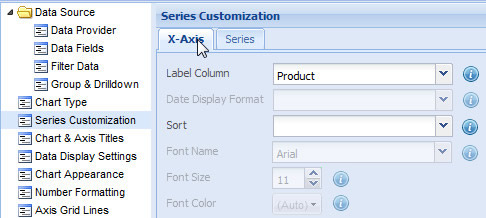
Data labels, associated with the data values of a chart, are placed along the X-Axis of the chart. X-Axis is the horizontal scale (vertical scale in bar charts) of a chart.
Data labels are also present in charts that do not have the X-Axis, like pie, doughnut, radar, pyramid, and funnel.
Learn how to:
- Specify the source of the data labels
- Define the date format of labels
- Sort the data labels
- Customize the font properties of the data labels
Specify the source of the data labels
You can specify the field or the data column of the data source from which data labels are provided to the chart.
For this, select the name of a field or data column from the Label Column drop-down list. Click Preview to view the change.

Note: The list contains the names of all the fields or data columns that have been selected in the Select Fields page.
NOTE:
Click Apply to apply the change made.
Click Revert to undo the change.
Define the date display format of labels
If the labels of a chart show date values, you can apply a date format to the date values. The Date Display Format drop-down list provides a list of sample dates showing various standard dates.
You need to select a sample date format from the Date Display Format drop-down list. Click Preview to view the change.
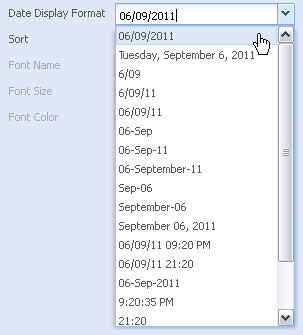
NOTE: This feature is available only when a column of Date/Time type is selected in the Label Column setting.
NOTE:
Click Apply to apply the change made.
Click Revert to undo the change.
You can sort the order of the data labels in a chart. You can either sort the data in ascending order or descending order.
Select the required sorting option in the Sort drop-down list. Click Preview to view the change.
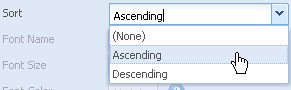
NOTE: If you do not wish to apply sorting, simply select (None).
NOTE:
Click Apply to apply the change made.
Click Revert to undo the change.
Customize the font properties of the data labels
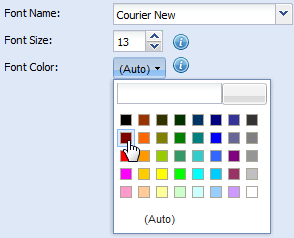
You can customize the font properties of the data labels only in Multi Series charts. You can customize the font properties using the following steps:
- Choose the font face from the Font Name drop-down list.
- Select or enter the font size in the Font Size box.
- Select the font color from the Font Color drop-down color picker. Choose (Auto) to make the chart automatically decide the color.
- Click Preview to view the changes.
NOTE:
Click Apply to apply the changes made.
Click Revert to undo the changes.